

iOS 26 public beta is finally here, and this time, Apple has added some exciting AI features that are actually useful in everyday life. You can try them out right now, and honestly, you might be surprised by how helpful they really are. Sure, the big Siri 2.0 update is still on the way, but what we got in this version already fixes many common problems users have been facing, and adds a few fun tools too.
Tech reviewers from The Verge and Washington Post have mixed but mostly positive feelings. They call the new “Liquid Glass” design one of Apple’s boldest visual updates in years. Features like Llve translation, visual intelligence, call screening, and adaptive power mode are getting praised for solving real user problems. On the other hand, some early feedback mentions performance issues and limited language support. And of course, we’re still waiting for the full Siri upgrade. In this article, we’ll break down the most talked-about iOS 26 AI features, what they do, why they matter, and how you can try them right now.

7 Game-Changing AI Features Coming to iOS 26
1. Enhanced Siri
On iOS 26, Siri listens to what you say and retains your words. It follows up when you ask more questions. Siri answers from your texts, apps, and schedule. Depending on the time of day, location, and the tasks at hand, it can propose suggestions tailored to you. Apple engineered Siri in this fashion to serve you with assistance customized for your daily flow. Siri now behaves more like a smart companion than before.
But still, many users feel that Siri remains basic. Before iOS 26, Siri was slow and didn’t understand most commands well. Now, iOS 26 works faster, understands better, and helps more with daily tasks. People like the new features, but some still wait for the full Siri update. Reddit users wrote: “It feels half‑baked. I don’t notice much improvement over the previous.” Others think Apple waited too long: “AI on phones is still early. Apple waiting to get it right makes sense”. Apple says deeper Siri changes come in 2026, but the groundwork is in iOS 26.
Try it now:
- Ask follow-up questions with Siri during a conversation.
- Have Siri distill your messages or post questions explicitly tailored to specific apps.
- Test Siri’s suggestions whenever you open everyday apps like Messages or Calendar.

2. Visual Intelligence
You can tap items you see on the screen or capture screenshots using Visual Intelligence. It identifies objects like books, art, landmarks, plants, and animals, and matches them on‑device without contacting servers. Point on a screenshot section, then summon Apple Intelligence to act. For instance, you can use “Ask” to send that image to ChatGPT or search Google for similar items. It also finds event info and lets you add it to your Calendar directly. Before iOS 26, iPhones couldn’t easily understand or describe images. Now, Visual Intelligence lets your phone recognize things in photos and give smart suggestions. Users say it saves time and feels helpful, but it sometimes misses small details.
Still, many beta testers report issues. On Reddit, someone posted: “Visual Intelligence screenshot feature not working on an iPhone 15 Pro.” Speaking generally, publications cite fast performance and commendable responses to screenshots and captured live scenes.
Try it now:
- Hold the Camera Control or Action button (on supported iPhone models).
- Tap on screenshot previews and use “Ask”, “Add to Calendar”, or “Search”.
- Take aim at a plant or edifice and see what Apple says about it.
3. Automatic Translation
In iOS 26, real-time spoken and text translation is built directly into Calls, FaceTime, and Messages. It starts with French, German, Spanish, and Portuguese, and shows translated speech overlaid on top of the original audio, like in live interpretation.
Tom’s Guide put it to the test on an iPhone 16 Pro Max and concluded that it sounds smooth and natural. It compared favorably to Galaxy AI, which offered more languages but felt delayed in replies. Before iOS 26, users had to open separate apps to translate languages. Now, Automatic Translation works right in messages, calls, and even live conversations. People find it smooth and fast, but it doesn’t support all languages yet. Despite the considerable praise for its polished flow, many users still hope Apple will add more languages soon. They call it simple but powerful.
Try it now:
- In Messages or FaceTime, begin a dialogue in one of the supported languages.
- See the translation unfold in real time whenever each speaker speaks.
- Test incoming and outgoing translations during live calls.

4. Screening Tools (Call & Message Filtering)
With iOS 26, Apple introduces sharper tools for sidestepping spam and calls from unknown numbers. Should an unknown caller dial in, Siri prompts them to identify the reason for their call before the phone rings. If they wait on hold, iOS detects when someone picks up and alerts you automatically. It likewise screens messages from unknown senders, helping you sidestep distracting spam in both Messages and FaceTime requests. Some Reddit users say it blocks lots of junk, but occasionally valid contacts get stuck in screening loops.
Try it now:
- In the Settings app, tap Phone → Screen Unknown Callers → Hold Assist and turn them both on.
- See how iPhone prompts unknown callers before ringing.
- Check message filtering in Messages settings to vet senders.
5. Liquid Glass Design
With its debut in iOS 26, Liquid Glass delivers a new, translucent look that animates across every interface. Apple calls it its biggest redesign in a decade, inspired by visionOS and used across iPhone, iPad, Mac, and more. Before iOS 26, the iPhone screen looked flat, and the design felt old. Now, Liquid Glass adds depth, shine, and a smooth look to your screen. Users love the fresh style, but some say it drains more battery.
Users praise its fluid motion and shiny icons. One Reddit comment:
“Apple’s latest Liquid Glass design shows it won’t back down with iOS 26”.
Designers worry smaller app teams may struggle to match Apple’s visual standard. iOS 26 beta 5 tweaks animations and transparency to boost readability and battery life.
Try it now:
- Update to the latest iOS 26 beta.
- Dress up your Lock Screen and Home Screen with spatial or dynamic wallpapers.
- Take notice of the motion effects and translucency in Control Center and its menus.
6. Personalized Chat and CarPlay Tools
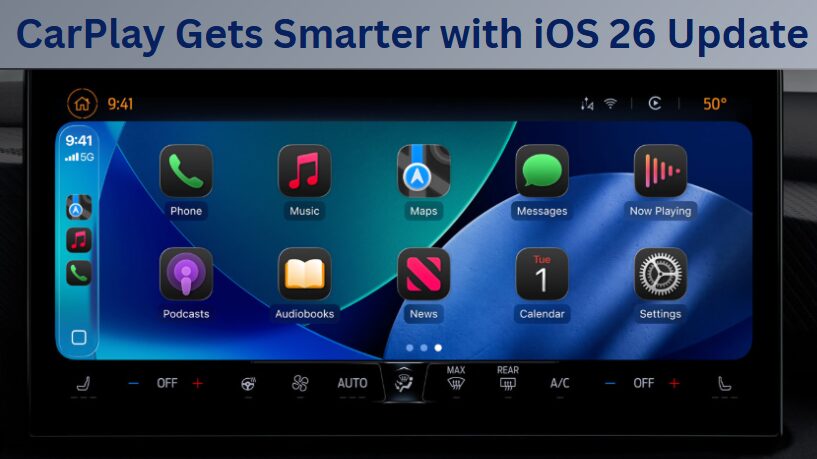
Messaging now lets you set chat backgrounds, run polls, and transfer Apple Cash among group threads. Live typing indicators show who’s responding at any moment.
On CarPlay, Tapback reactions and swift Live Activities glimpse previews have been introduced. Many users find these fun and engaging in group chats, though some say they feel minor lag on older phones.
“Apple CarPlay iOS 26 Update Brings New Looks, New Features, More Utility”
Try it now:
- Within a group chat, tap the menu to add a background or start a poll.
- Send money or pay for shared costs with Apple Cash in Messages.
- While using CarPlay, watch out for updated Tapback reactions as well as notification preview bubbles.
7. Visited Places in Maps
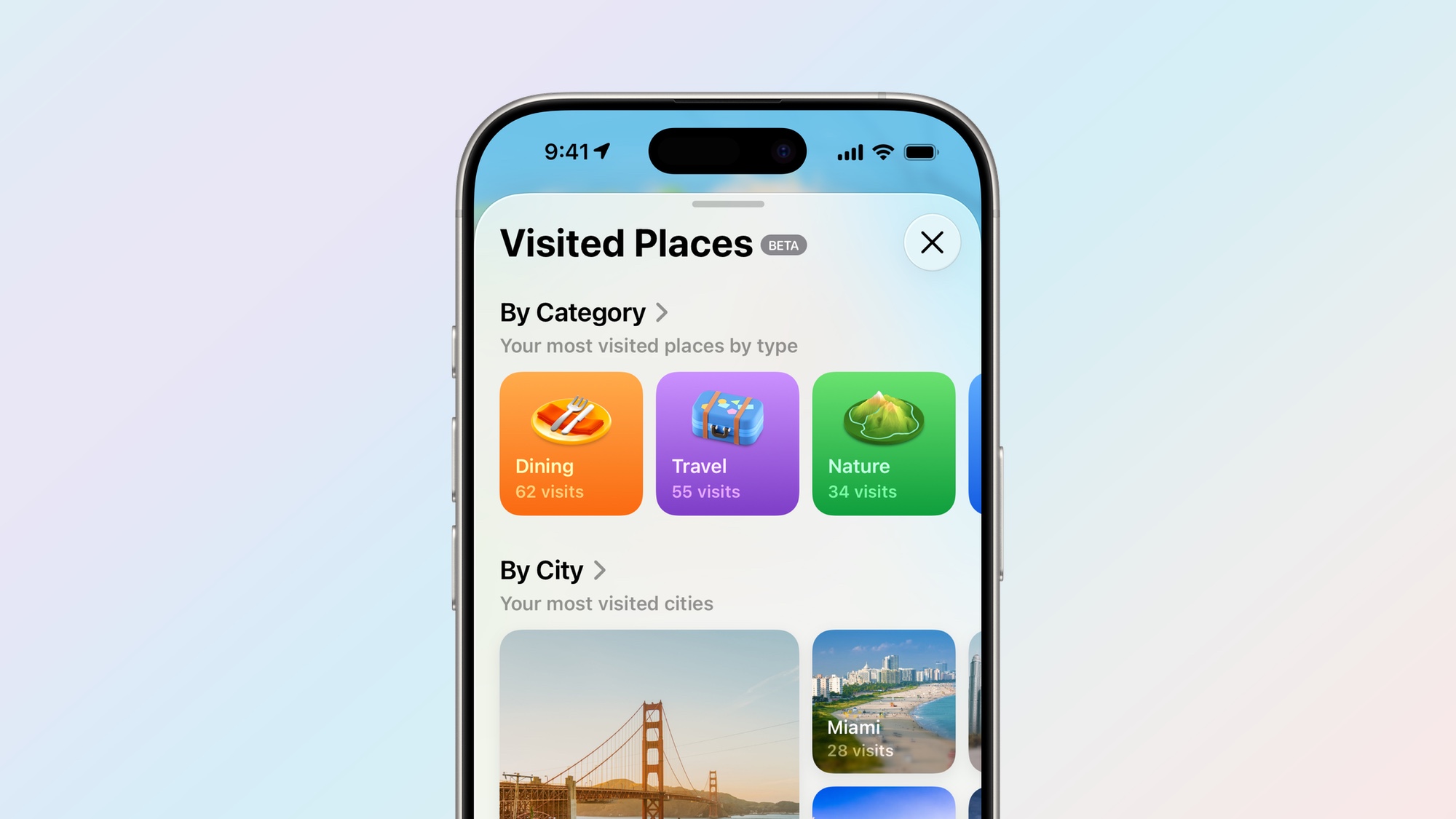
Maps now logs and categorizes your travel automatically. It groups locations by type and city, making it easy to revisit places without remembering their names. Many users appreciate the feature for tracking restaurants they’ve visited, shops they’ve patronized, or sights they’ve seen. Some users raise privacy concerns, even though Apple encrypts location data and claims to store information securely. Before iOS 26, iPhones didn’t track where you’ve been. Now, Maps logs places you visit—grouped by city or type—and keeps the list on your phone only.
One Reddit user wrote:
“It only shows places you’ve been to before, but doesn’t add any info on when you were…”
The other one said: This feature is currently available in the US, UK, Canada, Australia, Malaysia, and Switzerland.
Try it now:
- Open Maps → enable Visited Places in settings.
- Head to a couple of locations and then examine your profile or list view.
- Find your favorites on the log and schedule another visit or send them to friends.
For more details, you can watch this video:
iOS 26 – TOP Features YOU HAVE TO KNOW!!!
Conclusion
Apple’s iOS 26 users in tangible improvements thanks to AI that extends across the entire device. A few features already offer noticeable enhancements today—including live translation, refined call tools, and handy chat options. Several features still need a bit more refinement—among them a comprehensive Siri revamp and dependable performance on earlier Pro models.
The early availability of a public beta, alongside an anticipated mid-September 2025 launch, helps Apple lay a solid groundwork for AI-first iPhone use. Should Apple elevate performance and broaden support to past devices, future releases such as iOS 27 could render your phone genuinely smarter and noticeably smoother. Keep an eye out for the final rollout this fall, but feel free to try the beta now if you’d like to play around with it.
FAQs
1. When will iOS 26 officially launch?
Apple plans to unveil iOS 26 in tandem with its 2025 iPhone lineup in September of that year. Users can check out its features right now through the public beta. Apple will make the final version available worldwide on supported devices.
2. Which devices will get the full AI feature set?
Updated Apple Intelligence features—in full—will be available only on iPhone 15 Pro, Pro Max, or later models. Older devices will still receive design enhancements and less-complete AI features. This ensures performance stays smooth.
3. On iOS 26, can I disable selected AI tools?
Yes, the Settings app lets you disable individual Apple Intelligence features. This includes Enhanced Siri suggestions, Visual Intelligence, and more. Apple allows you to keep only the tools you use daily.
4. Will Automatic Translation work in all languages at launch?
When it initially debuts, the feature will only be available in a limited set of languages, such as Spanish, French, and German. Apple plans to expand the list with software updates. Certain regional languages may arrive at a later date, depending on demand and accuracy standards.
5. How do I install the iOS 26 public beta?
Enroll in Apple’s Beta Software Program with your Apple ID. Next, download the beta profile to your iPhone. Be sure to back up your device before performing an update to prevent any data loss.